
Quick Launch (Launch Keys)
Learn how to use Quick Launch with Agent Launch Keys to run any agent instantly.
What is a Launch Key?
A Launch Key (also called Agent Token) is a unique identifier for an agent. It's a UUID that looks like:
Launch Keys allow you to quickly start any agent on the Desktop app using the Quick Launch feature on the Dashboard.
Finding Launch Keys
You can obtain Launch Keys from the following sources:
- Peedika Store (Web): Browse agents on the orrerygen.com website. Each agent's detail page displays its Launch Key.
- Agent Documentation: Agent docs often include the Launch Key for quick access.
- Shared Links: Other users may share agent Launch Keys directly.
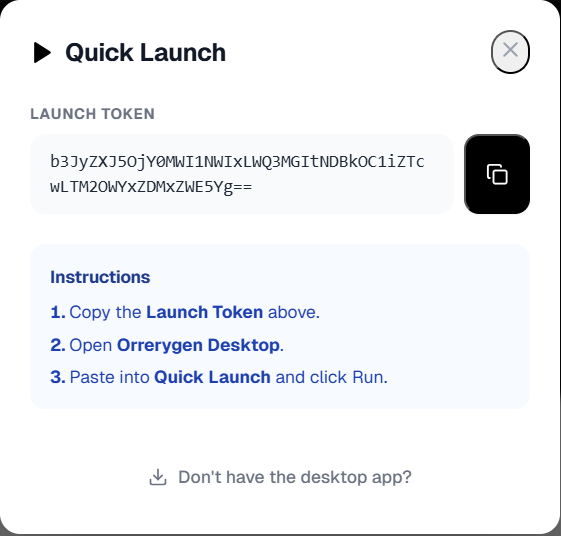
Copy the Launch Key
On the agent's detail page in the web marketplace:
- Locate the Launch Key section (usually displayed prominently).
- Click the Copy button next to the key.
- The key is now in your clipboard, ready to paste.
Note: Launch Keys are linked to specific agents. Make sure you copy the key for the agent you want to run.
Using Quick Launch on Desktop
Now use the Launch Key in the Desktop app:
- Open the Orrerygen Desktop application.
- Go to the Dashboard (the default landing page).
- Find the Quick Launch section with the dark background.
- Paste your Launch Key into the input field.
- Click the Run button.
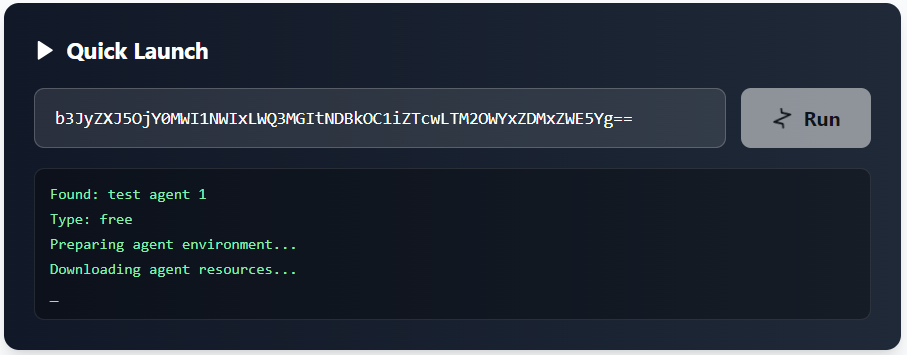
Agent Startup Process
After clicking Run:
- The system validates your Launch Key and checks your subscription.
- If the agent image isn't cached, it will be downloaded (you'll see progress logs).
- Once ready, the agent container starts automatically.
- The agent appears in your My Agents page as "Running".
Progress logs will appear below the Quick Launch input field during the download process.
Pro Tip
Free agents are also available in the Desktop Library (Peedika sidebar item). You can browse and install them directly without needing a Launch Key.